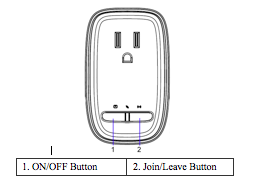
Lighting Defaulting the Sercomm Smart Plug(EM358x) (SZ-ESW01) Clint Wolford January 29, 2015 Remove the Smart Plug from it’s power source. Press and hold the Join/Leave button while plugging the Smart Plug back into the power source. The LED is blinking to indicate an attempt to join the Touchstone network. Related PostsInstalling the SMC Motion Sensor(SMC10MT-Z) Defaulting the Visonic MCT-340 Door/Window SensorAdding/Deleting Door Lock CodesManaging RulesVisonic Clip Motion (CLIP-SMA)Rebooting the Touchscreen Related ← Installing the Sercomm Smart Plug(EM358x) (SZ-ESW01) Defaulting the LG Zigbee Smart Bulb(EM35x) →