Testing Thermostat Operation After completing any necessary configuration make sure the thermostat is in Cool mode by pressing the MODE button until Cool is displayed at the bottom of the screen. Make sure the system is not calling for Cooling by setting the setpoint several degrees above the room temperature.…
THERMOSTAT INSTALLATION(PEARL)
Before you begin installing your thermostat, please be advised that It is always a good practice to consult the owner’s manual for your HVAC system. If necessary, consult an HVAC technician to ensure proper installation. Locating the Thermostat If this is to replace an existing thermostat, just use the existing…
VERIFYING THE THERMOSTAT(PEARL) IS READY TO PAIR
Joining Your Thermostat to the Hub The thermostat needs to be joined to the Hub after installation. The first step in the join process is to make sure the Hub is in it’s join network mode. To do this, navigate to the Add Devices tab in the subscriber portal and…
AZELA Thermostat Programming
To enter programming mode: PRESS FAN and MODE buttons at the same time. Then press the UP ARROW button while the fan and mode button are still held. The clock display will change to indicate which programming mode you’re currently in. The display will start at 10:00. If there is ever…
Testing the Thermostat(AZELA)
Testing Thermostat Operation After completing any necessary configuration make sure the thermostat is in Cool mode by pressing the MODE button until Cool is displayed at the bottom of the screen. Make sure the system is not calling for Cooling by setting the setpoint several degrees above the room temperature.…
Thermostat Installation(AZELA)
Before you begin installing your thermostat, please be advised that It is always a good practice to consult the owner’s manual for your HVAC system. If necessary, consult an HVAC technician to ensure proper installation. Locating the Thermostat If this is to replace an existing thermostat, just use the existing…
Installing the Carbon Monoxide Sensor (MCT-442)
Mounting and Installing The sensor can be mounted on a wall or ceiling. For EN approved sites, only ceiling installation is allowed. It must be mounted with its bracket (when it is attached to its bracket the tamper switch is pressed and the sensor automatic reset is performed). 1) Locate the bracket on…
Mobile App
The Touchstone Mobile app is available in the IOS and Android app stores. Once you’ve downloaded the mobile app, using it is a breeze. Follow the basic steps below to control your home from anywhere. Once you log into the mobile app, the Home Screen greets you with the current…
Defaulting SMC Water Sensor
To default the sensor, remove the battery. While pressingthe black Tamper/Default button located near the battery carrier and the wire contacts, insert the battery. Then release the button.
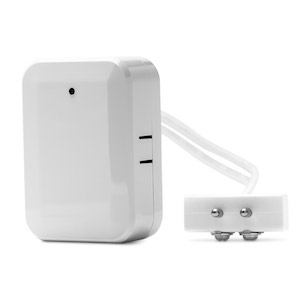
SMC Water Sensor (SMCWA10-Z)
The water sensor allows users to around the clock remotely detect the presence of water to provide early detection of costly leaks and floods that could be caused from sump pumps, water heaters, air conditioners, heavy rains, and more. The SMCWA10-Z consists of a Zigbee transceiver unit, 20ft cable, and…